How to create a chatbot with ChatGPT for your website
How to create a chatbot with ChatGPT for your website: why a custom GPT won't do it any more, the API steps, and what happened when we built one.
How to create a chatbot with ChatGPT
To create a chatbot with ChatGPT for your website, you use OpenAI's API, which runs the same models as ChatGPT, because ChatGPT itself can't sit on your site:
- Sign up on OpenAI's API platform and add credit. The API charges for every message.
- Create an API key. Keep it on your server, never in your website's code, or anyone can run up your bill.
- Collect your content: products, prices, shipping, returns, and FAQs.
- Write a small server that sends each question, your instructions, and the matching pieces of your content to the model.
- Add a chat window to your website: your own, or OpenAI's ready-made ChatKit window.
- Test it with hard questions before customers see it.
- Done! Your website has a chatbot running on the models behind ChatGPT.
No developer? A chatbot builder that runs on OpenAI's models does the same job without code: it reads your website, and you paste one line of code into your site. Our guide on how to create a chatbot for your website compares them.

You already use ChatGPT for emails and product descriptions. It's good, it's cheap, and it's everywhere. So the obvious question is why you can't just put it on your website and let it answer customers.
You can, but not the way most videos show. The tutorials still walk you through ChatGPT's GPT builder, and OpenAI has switched that off for personal accounts and is retiring custom GPTs on 11 December 2026.
Matey builds custom chatbots for Australian businesses. This guide covers what still works for putting ChatGPT on a website, and what happened when we built one the same way for a real Aussie store. It's part of our guide on how to build a chatbot.
Can you still make a custom GPT?
Not on a personal ChatGPT account. OpenAI's help centre says new GPT creation and publishing aren't available on Free, Go, Plus, or Pro accounts, and custom GPTs are scheduled to retire on 11 December 2026.
Existing GPTs keep working until then. OpenAI is moving them to plugins, which bundle instructions, reference files, and connected apps, and suggests a project for anyone who used a GPT to keep instructions and files together (OpenAI).
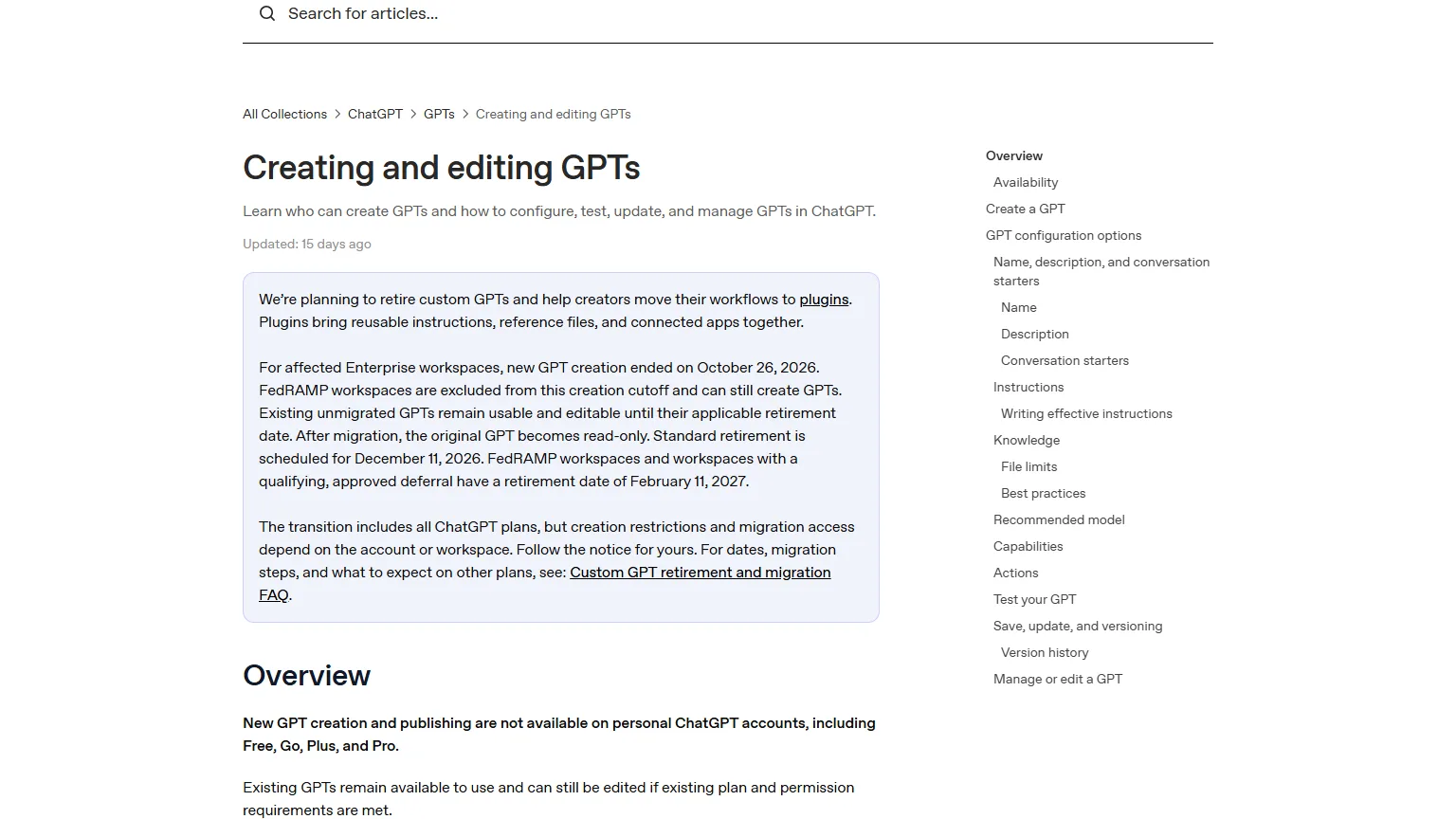
That's worth knowing before you follow a tutorial. Most of the videos on page one for this search, and Google's own AI overview, still start with the GPT builder.
Can you put a custom GPT on your website?
No. A custom GPT only works inside ChatGPT, for people logged in to ChatGPT, and so do the projects and plugins replacing them.
That rules them out for customers. A shopper on your website at 9pm won't sign in to ChatGPT to ask about your returns policy. Inside your business, though, a project is handy. Give it your policies and product sheets, and your staff get a helper that answers in your words. To set one up, select New project in ChatGPT's sidebar, add your instructions in the project's settings, upload your files, and start a chat in the project.
How to make a chatbot with the ChatGPT API
To make a chatbot with the ChatGPT API, a developer connects a chat window on your website to OpenAI's models, through a small server that adds your instructions and your own content to every question.
The model doesn't know your store. Every question goes to it with the few pieces of your content that match, found by searching your pages first. Getting those pieces right is most of the work, and our guide on how to train a chatbot covers what to give it.
For the chat window itself, OpenAI's ChatKit is a ready-made chat a developer can drop into a website (OpenAI). OpenAI's Agent Builder, which hosted the chatbot's logic behind ChatKit, shuts down on 30 November 2026, so new builds run that logic on their own server.
Then come the bits nobody films a tutorial about: a hand-over to a person, a record of every chat, limits so nobody can run up your bill, and a refresh of your products and prices every day.
What happened when we built one
We built a chatbot this way for an Australian online footwear store, on Google's Gemini rather than OpenAI's models (the steps are the same), and asked it the 20 questions in the Matey break-it test. It got 10 right.
The AI model wasn't the problem. Every wrong answer came from the store's own website: an old article still advertising Nike Air Max, which the store doesn't sell, an out-of-date free shipping line, and sold-out sizes that read like they're in stock. A chatbot on any AI model repeats what your website says, so cleaning up your content comes first. The full results are in our guide on how to build a chatbot.
Can I create a chatbot with ChatGPT for free?
Not for your website. OpenAI's API charges for every message, and personal ChatGPT accounts can't create new GPTs.
Chatbot builders that run on OpenAI's models often have a free plan with a small monthly limit. That's fine for trying the idea on a quiet website, and too small for a busy store.
Is ChatGPT a chatbot or an AI agent?
ChatGPT is an AI chatbot: you type a question and it answers. When it uses tools to do things for you, like searching the web or working through a task step by step, it starts acting like an AI agent.
The difference matters for a business. A chatbot answers your customers. An AI agent can also do things in your systems, like book a job or look up an order. Our plain-English guide to what an AI agent is has the test for telling them apart.
Or skip the API. Matey builds custom chatbots for Australian businesses from your own products, prices, and policies, reads your whole catalogue fresh every night, and hands customers to your team when they need a person. Send us your website and we'll build a free demo, usually within 24 hours.
FAQs
Can I use ChatGPT to create a chatbot for my website?
Yes, but not with ChatGPT itself. ChatGPT, its projects, and its plugins only work inside ChatGPT. For your website, use OpenAI's API, which runs the models behind ChatGPT, with a chat window on your site, or use a chatbot builder that runs on OpenAI's models.
Can I still make a custom GPT?
Not on a personal ChatGPT account. OpenAI's help centre says new GPTs can't be created or published on Free, Go, Plus, or Pro accounts, and custom GPTs are scheduled to retire on 11 December 2026, replaced by plugins.
Can you put a custom GPT on your website?
No. A custom GPT only works inside ChatGPT, for people logged in to ChatGPT, and so do the projects and plugins replacing them. To put ChatGPT-style answers on your website, you need OpenAI's API and a chat window, or a chatbot builder.
How do you make a chatbot with the ChatGPT API?
Sign up on OpenAI's API platform, add credit, and create an API key. Then write a small server that sends each customer question, your instructions, and the matching pieces of your own content to the model, and shows the answer in a chat window on your site. OpenAI's ChatKit gives developers a ready-made chat window.
Can I create a chatbot with ChatGPT for free?
Not for your website. OpenAI's API charges for every message, and personal ChatGPT accounts can't create new GPTs. Some chatbot builders that run on OpenAI's models have free plans with small monthly limits, which are fine for trying the idea.
Is ChatGPT a chatbot or an AI agent?
ChatGPT is an AI chatbot: you type and it answers. When it uses tools to do things for you, like searching the web or working through a task step by step, it starts acting like an AI agent.